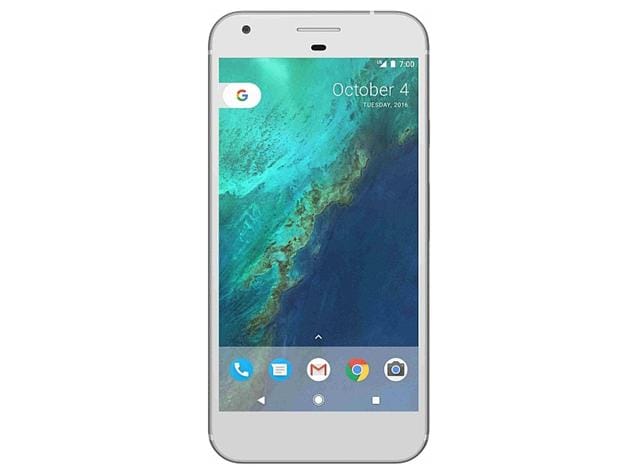
Google Pixel smartphone was launched in October 2016. The phone comes with a 5.00-inch touchscreen display with a resolution of 1080 pixels by 1920 pixels at a PPI of 441 pixels per inch.
The Google Pixel is powered by 1.6GHz quad-core Qualcomm Snapdragon 821 processor and it comes with 4GB of RAM. The phone packs 32GB of internal storage cannot be expanded. As far as the cameras are concerned, the Google Pixel packs a 12.3-megapixel primary camera on the rear and a 8-megapixel front shooter for selfies.
The Google Pixel runs Android 7.1 and is powered by a 2770mAh non removable battery. It measures 143.80 x 69.50 x 8.60 (height x width x thickness) and weighs 143.00 grams.
The Google Pixel is a single SIM (GSM) smartphone that accepts a Nano-SIM. Connectivity options include Wi-Fi, GPS, Bluetooth, NFC, 3G and 4G (with support for Band 40 used by some LTE networks in India). Sensors on the phone include Compass Magnetometer, Proximity sensor, Accelerometer, Ambient light sensor, Gyroscope and Barometer.
At its Playtime event for Android developers today, Google announced that apps on the Play Store will soon gain a new option that could have huge implications for subscriptions: temporary promotional pricing. "Coming soon, you'll be able to create an introductory price for new subscribers for a set period of time," Google's Larissa Fontaine wrote in a blog post. "For example, you can offer a subscription for $1 per month for the first three months before the normal subscription price kicks in."
There are many app categories where this could make a big difference. Music and video are certainly on that list; maybe cheaper introductory pricing could boost Google's own struggling YouTube Red service, or help Spotify maintain its lead over Apple Music and other rivals. Other apps like internet TV offerings (Sling TV, PlayStation Vue) and productivity tools (Evernote) also stand to benefit if developers are willing to temporarily cut their prices in hopes that customers will stay subscribed once the normal rate kicks in — either because they forgot or, more ideally, actually find the app or service to be worth the monthly charge.
"Subscriptions are the fastest growing business model on Play, with consumer spending in subscription apps increasing 10x over the last 3 years," wrote Fontaine. And with that in mind, this year both Apple and Google have adjusted the revenue-sharing terms around subscriptions to give app makers a bigger cut than before. For iOS developers, apps must maintain a customer's subscription for at least 12 months before the more favorable 85/15 split takes effect; Google Play doesn't have the same long-term subscriber requirement.
Google’s virtual reality team has said that they want the Daydream controller, a little remote with an internal motion sensor and a trackpad, to be the “mouse of VR” — a standardized control system that people intuitively comprehend the moment they pick it up. But unlike your average mouse, the Daydream controller still only works with a small subset of devices: new Android phones that support the Daydream standard. iOS users, in particular, are being left in the cold. That’s why mobile headset maker Merge VR is working on its own, more universal take on the controller.
The Merge VR remote is still in an early state; we saw a 3D-printed prototype at the VR Developers Conference in San Francisco. But its creators say they’ve been working on it in some form for a year and a half. The version we saw has a lot more buttons than the Daydream remote — two arrows, two face buttons, one analog stick, two bottom triggers, and a little home button on the end, to be precise. The latest design supposedly gets rid of most of these, bringing it to rough parity with Daydream. It can be paired with the Merge VR headset, seen above, but it can also be used with any other third-party headset or even non-VR device, as long it’s supported by a given game or app. Think of it as a third-party Bluetooth gamepad with an unusual design.
As with Daydream, you mainly use the Merge controller by pointing. In one Halloween-themed demo, it’s a combination laser gun and fishing rod; you break apart tombstones by pulling the gun trigger, then “hook” the ghosts that come out and pull them into a holding container. In a second, it’s a stick used to shape clay on a pottery wheel, and in a third, it controls the movements of a small spaceship.
It’s difficult to judge how well Merge VR’s product stacks up against Daydream without having spent more time using both. It’s highly responsive, but since it doesn’t have true spatial tracking, just a directional sensor, it requires some awkward wrist-twisting in order to turn it in the correct direction. Daydream’s hardware is similarly limited, but its software models natural arm movement in a way that Merge VR doesn’t seem to right now.
Since Daydream isn’t a single device, but a larger standard, it’s plausible that other mobile headset makers will just make their own versions of Google’s controller, rather than adopting Merge VR’s design. But Merge VR is useful for any company that doesn’t want to hew to Google’s specifications, including anyone that want to build headsets or experiences for iOS users. Google Cardboard serves this segment for now, but it’s starting to look more and more primitive compared to other options. Until Apple shows off a VR solution — if it ever does — the market is wide open for products like this.
Zotac has introduced multiple mini PCs that are VR-ready and able to fit in backpacks, but now the company is planning to release a computer that comes with removable straps attached, according to Anandtech. I love an all-in-one purchase. The VR Go PC is packed with:
Intel Core i7 processor
GeForce GTX 1070 graphics card
Removable battery
2.5-inch HDD or SSD bay
One HDMI output
Two USB 3.0 ports
A power connector
A proprietary cooling system
Zotac put the HDMI, USB ports, and power connector on one side for easy cable management. The PC can also be taken off the straps and used as a regular desktop computer. Seriously, all-in-one purchases are a beautiful thing. Zotac didn’t provide info on a release date, price, or how long the battery will last. I know, I’m sorry. The company previously showed off a proof-of-concept VR backpack, so at least we're getting more details about that idea.
Zotac
Zotac also debuted another new mini VR-ready PC this week called the Magnus ERX480. It runs Windows 10 and is approximately eight by seven by two inches. I’m not sure how much it weighs, but it can’t be much. I know it'll fit in a backpack. You’ll have to buy the backpack yourself, though. Sad.
If it weren’t for Pokémon Go, augmented reality might have stayed another forlorn futurist technology the public paid little attention to. Instead, the AR mobile game from developer Niantic Labs, a former Google subsidiary, catapulted the technology to hundreds of millions of smartphone owners around the world. Now a few months after the game’s launch, the first fully capable AR smartphone has started shipping. It’s Lenovo’s Phab 2 Pro, and under the hood it contains the hardware and software neccesary to use Google’s Tango AR technology.
Pokémon Go didn’t accelerate Tango’s consumer timeline, which has been in place since the team began discussions with Lenovo last year. "Actually I think Pokémon Go took everyone by surprise, including Niantic," Tango chief Johnny Lee, who spoke to members of the press at a roundtable event last week, says with a laugh. "Pokemon Go certainly made the conversation a lot easier with partners."
"POKEMON GO CERTAINLY MADE THE CONVERSATION A LOT EASIER WITH PARTNERS."
Jokes aside, Lee thinks the game proved the strength of AR, despite only using a rudimentary version of the tech. (Pokémon Go didn't map your surroundings. It just haphazardly plunked down a virtual creature square in the middle of the screen.) Niantic’s creation showed people how powerful an experience can be when you plant software in the real world and let people interact with one another. "It’s the idea that you can use physical space in a shared context," Lee adds. "The location-tracking capabilities of Tango can be the same vehicle for shared context between people."
With the Phab 2 Pro, which is now selling for $499, Lenovo and Google are trying to prove that AR can and should become an integral component of modern smartphones. Lee thinks of Tango’s technology much like GPS, which transformed the utility of mobile phones and, years later, helped give birth to services like Uber. If AR is equally transformative in letting our devices understand physical spaces and "see" the world, it could help reshape entire industries, from gaming to retail to real estate.
THE PHAB 2 PRO IS JUST THE BEGINNING
We’re a ways away from that point, stuck between the extremes of Microsoft’s $3,000 prototype HoloLens headset and Niantic’s free-to-play Pokémon Go. The Tango team wants to create a middle ground for both hardware and software, and it thinks the Phab 2 Pro is the place to start.
To its credit, Lee’s division has progressed over the last two years from developer kit tablets to oversized retail smartphones. But the applications for AR are still quite limited. Many of them revolve around mobile gaming, using the Phab 2 Pro’s extra sensors and camera capabilities to turn living rooms into virtual play spaces. Down the line, Google wants to put Tango technology into many more phones and to expand how we think of AR. By next year, Lee says there will be more devices — and not just Lenovo’s — containing the necessary hardware to 3D map our surroundings.
Until then, we’re stuck with the Phab 2 Pro. It’s not a bad phone by any means. It’s just a very niche device that’s impractical for a vast majority of smartphone owners. At $500, it’s cheaper than an iPhone or Google’s Pixel. Yet with a 6.4-inch display, the Phab 2 Pro can hardly be held with one hand. It barely fits in even large-sized pant pockets. No amount of nifty AR tech will sell people a phone that’s cumbersome to use for even the most basic of tasks.
That might be okay. Google and Lenovo both understand that the Phab 2 Pro will act as more of a proof of concept than a device designed to sell millions of units. In that context, the phone excels. Its large display and powerful camera allows you to view huge swaths of a room with virtual objects overlaid over the scenery. Many of the early Tango apps also make use of gesture control and other real-world movements to avoid forcing users to place their fingers on the touchscreen. This way, the scene can play out on the screen without any interference.
I tried a number of apps, all of which go live today on the Google Play Store, that were designed specifically for Lenovo’s Tango-equipped phone. (Some were created as part of Google's Tango App Incubator program.) There’s a Hot Wheels game made by Mattel that creates a virtual test track to send race cars down. Another game, Slingshot Island from developer Sockethead Games, plants a floating landmass in the middle of a room. You’re tasked with toppling structures on the island’s surface using a gyroscope-powered slingshot mechanic, much like Angry Birds.
There’s also Towers for Tango, a business simulation game that places an small city on the table in front of you and lets you employ workers, build additions to apartment complexes, and grow the local economy. The games are neat, and also a little gimmicky, but the technology is certainly there. It’s remarkable to see entire 3D worlds play out in the camera viewfinder, and many of the Tango games force you to get up and move around as much as possible. It’s clear AR succeeds at getting users to stand up and get mobile, and I found myself walking in circles to inspect other parts of a virtual scene and even crouching down to try and get eye level with some objects and architecture.
AR SUCCEEDS AT GETTING USERS TO STAND UP AND GET MOBILE
Of the 35 or so Tango apps now available, a small handful have practical business purposes. There are a few apps, including one from Autodesk and another from Lowe’s, that let you place virtual furniture and appliances in your home to help visualize a purchase without having to pull out a tape measure. These applications, while boring at first glance, show the potential of AR to move beyond gaming and into industries where 3D mapping can truly transform how companies do business. Imagine being able to know exactly how an art print or new couch looks in your apartment, and not just by the measurement numbers, but with a virtual representation of the finished scene.
Until there's more devices out there with Tango tech — and thats not happening until next year, at least — this all feels very much like an experimental test phase for AR. But developers don't seem too discouraged. That's both because Pokémon Go proved there's an appetite for these type of mobile experiences, and Google is convinced it's only a matter of time before every phone makes the jump to 3D mapping.
"This is something that is not going to go away," says Legacy Games CEO Ariella Lehrer, whose company is making a kid-friendly zombie game called Crayola Color Blaster. "This ability to understand space is coming, and I think the market is going to be very large."
The Daydream View, Google’s new virtual reality headset, is officially coming November 10th. Google announced the news in a blog post today, and opened a Google Store pagefor the $79 headset, which can now be preordered. Verizon and Best Buy are also selling the Daydream View in the US, and other retailers and mobile companies will carry it in Canada, the UK, Germany, and Australia.
The View is the first of what Google hopes will be many headsets to support its upcoming Daydream VR platform, which is built into Android Nougat. For now, it requires Google’s recently announced Pixel or Pixel XL phone to work, but other compatible phones are supposed to be announced in the coming months.
Currently, the View is only available in one color, Slate. Two additional colors, Crimson and Snow, will be available later. All headsets are made of soft cloth and foam, with a plastic frame. The Daydream View headset package includes a plastic remote control that charges via USB-C; you can buy a cable separately or use the one that came with the Pixel.
Daydream is the followup to Google’s cheaper, simpler, and less sophisticated Cardboard platform. A variety of apps will be available at launch, including VR news apps from The New York Times and The Wall Street Journal, games like turret shooter Gunjack 2 and puzzler Danger Goat, and experiences like a tie-in to Fantastic Beasts and Where to Find Them.
Earlier this week, the news broke that the automatic boot feature on Apple’s new MacBook Pros — which causes the computer to start up when the lid is opened — came at a heavy price: the removal of the iconic Mac boot-up chime.
BRING BACK THE CLASSIC STARTUP SOUND EFFECT
But, hope is not yet lost, as MacRumors forum user jessejarvi has figured out a way to bring back the classic startup sound effect. By going into the Terminal application (which is located in the Utilities folder inside your Applications folder) you can use the following commands to toggle the automatic boot-up and startup chime.
As a word of caution, this is modifying some stuff at a system level, so try this out at your own risk (although as command line work goes, this should be relatively harmless). Additionally, those hoping to use this method to enable the automatic boot-up on their older MacBooks are out of luck — the new feature is still exclusive to the updated MacBook Pros.
Remember the original Galaxy Gear? Hard not to — gadgets don’t get much gadgetier and clunkier than Samsung’s first big attempt to figure out why folk might want computers on their wrist. One of its key features was the camera embedded in the watch strap, letting you quickly snap photos without the need to get your phone out, and now a company is aiming to bring similar functionality to the Apple Watch.
The CMRA band comes from Israeli startup Glide, who already makes an Apple Watch-compatible video chat app. It looks like one of Apple’s rubber Sport Bands but incorporates an 8-megapixel primary camera as well as a 2-megapixel module angled toward the face. While it’s not quite clear how CMRA integrates with the Watch, it does require its own battery — Glide includes a stand that charges both the Watch and the CMRA and can also be used on the go.
"The camera is only valuable when it is out and ready to take a photo or video," Glide CEO Ari Roisman tells Recode. "Our phones live in our pockets." If CMRA is able to be used without too much reliance on the phone, that’ll certainly be the selling point. But that’s probably a big "if."
CMRA won’t ship til spring next year, however — preorders open today for $199, or $149 if you’re quick. The regular selling price will be $249.
Apple is taking a lot of flack for its decision to drop the SD card slot from the new MacBook Pro range and outfit it with Thunderbolt ports only, but the company is confident it’s made the right choice — even if a lot of users won’t agree with its reasoning.
Speaking to The Independent, Apple exec Phil Schiller said the company had dropped the SD card slot as it was "cumbersome" and because wireless transfer technology for cameras is "proving very useful" as an alternative. A lot of photographers, though, would disagree with this. Although wireless tethering is certainly getting better, it’s frequently buggy and still slower than using an SD card to get photos from to your computer. In a professional situation where speed and reliability count, it’s not a viable alternative, which is why people will be forced to use a dongle instead.
Here's Schiller’s full answer on why the SD card slot was dropped:
Because of a couple of things. One, it’s a bit of a cumbersome slot. You've got this thing sticking halfway out. Then there are very fine and fast USB card readers, and then you can use CompactFlash as well as SD. So we could never really resolve this – we picked SD because more consumer cameras have SD but you can only pick one. So, that was a bit of a trade-off. And then more and more cameras are starting to build wireless transfer into the camera. That’s proving very useful. So we think there’s a path forward where you can use a physical adaptor if you want, or do wireless transfer.
When asked if it’s "inconsistent" for the MacBook Pro to retain the traditional headphone jack (another widely-used connector that Apple has dropped from the iPhone) Schiller says that professionals still need that on a laptop for other types of audio gear that doesn't work wirelessly. "If it was just about headphones then it doesn’t need to be there, we believe that wireless is a great solution for headphones," he says.
In a follow-up interview a day later, Schiller also notes that there has been "a lot of passionate dialogue and debate about the new MacBook Pro." He adds that he’s been surprised by the criticism, but says the decision to only use Thunderbolt ports was a "bold risk" and Apple will "help people through these changes."
The new MacBook Pro was so long and painfully awaited that our hopes probably ran away with us. We thought Apple would conclude the wait with a laptop that would last with us for years, but instead we got a transitional device that bridges the perpetual gap between present and future with the metal corpses of (almost) every useful port we now use and rely on. Apple’s position is clear: you either sign up for its vision of wireless and USB-C communications dominating everything, or you go elsewhere.
For those adventurous MacBook users who are now finding themselves more open to exploring Windows waters, here’s a quick rundown of the top alternatives to Apple’s new, port-less MacBook Pro.
This laptop is the most obvious and direct alternative to the MacBook Pro. Dell’s 13-inch XPS 13 has a wonderfully minimal bezel around the display, a great keyboard, good trackpad, solid construction, and attractive design. Its battery life stretches up to 10 hours and it has recently been upgraded with Intel’s 7th-generation (Kaby Lake) processors, a generation ahead of Apple’s latest MacBook Pros.
Handsome, affordable, and a proven design that won’t spring any surprises: there’s very little wrong about the Dell XPS 13. It can be had with 8GB of RAM, 256GB of storage, and that lovely gold shell above for $1,199. To get it with a high-resolution (3,200 x 1,800) touchscreen display, you’d have to step up to $1,449, but that’s still $50 less than the MBP and it manages to fit an SD card reader and two regular USB ports alongside the Thunderbolt 3 connector.
This one, I’m less confident about, but it sure is a stunning piece of machinery, isn’t it? Razer’s 12.5-inch Blade Stealth is the gaming gear maker’s first ultrabook, and it does the whole aluminum unibody thing in a gorgeous matte black highlighted by the company’s signature Chroma keyboard backlighting. You can have it with a Quad HD (2,560 x 1,440) display, a Kaby Lake CPU, 256GB of storage, regular USB and a Thunderbolt 3-capable USB-C for $1,250.
Now, granted, the Blade Stealth is kind of in a funny position with its own lack of an SD card slot, and its battery life won’t rival the MacBook Pro’s, but Razer’s secret weapon with this laptop is the ability to plug it into the company’s Core box. For another $400, the Core lets you hook up a full desktop graphics card to the Blade Stealth, which raises it gaming ceiling exponentially, lending this laptop a unique advantage that many in its category lack.
Props to my colleague Dan Seifert for calling this one out as a very attractive escape route for dissatisfied MacBook users. HP’s newly updated 13-inch Spectre x360 has an edge-to-edge display much like Dell’s XPS 13, but it also has a fully rotating hinge like Lenovo’s Yogas. It’s got a quad-speaker array, and HP makes some terrific claims about it lasting up to 15 hours on a single charge — even if it only achieves two-thirds of that claim, it seems likely to be able to keep you productive through a whole day’s work.
At 2.85lbs (1.29kg), the 13.3-inch HP Spectre x360 is lighter than Apple’s corresponding new MacBook Pro. It also has two USB-C ports, but HP doesn’t forget to include a regular USB one "for added flexibility." Alas, this super thin and light computer does lack an SD card slot, so you’d have to go to the 4lbs (1.81kg), 15-inch model to have that photographer-favored port. Still, with prices starting at $1,159, there’s a lot of headroom to max out a Spectre x360’s spec before reaching even the entry-level MacBook Pro’s cost. Worth considering.
I saw this laptop at IFA 2016, and The Verge’s Tom Warren reviewed it very recently. Our shared conclusion? The ThinkPad X1 Yoga has a couple of foibles, but its OLED display is easily among the very best we’ve seen on a laptop. Spanning a resolution of 2,560 x 1,440 and including touch capabilities, it’s pretty close to our ideal laptop display.
Being a Yoga laptop also means this one can rotate a full 360-degrees, which doesn’t matter on a daily basis but is a nice extra to have. Apple’s MacBooks have always opened to just a little bit past vertical, which can be problematic when they’re used in bed or in any other circumstances that are less than ideal. Now, buying into this OLED futurism isn’t cheap, and the ThinkPad X1 Yoga with OLED starts at $1,682 right now, but I’d say this is a much more enticing use of the technology than Apple’s thin strip of it above the keyboard (aka the Touch Bar).
Well, it couldn’t be a roundup of the best Windows computers without one from Microsoft, now could it? The newly refreshed Surface Book has more of everything: more power, longer battery life, and a higher price. Kicking off at a mighty $2,399, this 13.5-inch laptop includes a stylus and a touchscreen along with an SD card slot and some trusty old USB ports. The display is detachable from the base, and there’s a discrete Nvidia GeForce GTX 965M graphics chip to amp things up.
The biggest advantage of this upgraded Surface Book is Microsoft’s claimed 16 hours of battery life, which is an extraordinarily long endurance by any laptop category’s standards. And it doesn’t weigh all that much, either, at 3.63lbs (1.65kg). As its screen size, weight, and price suggest, the Surface Book sits somewhere between Apple’s 13-inch and 15-inch MacBook Pro models, but it offers plenty of functionality (and ports) that Apple’s new computers lack.


/cdn0.vox-cdn.com/uploads/chorus_asset/file/7404579/merge_vr_remote_adi_robertson_3.jpg)
/cdn0.vox-cdn.com/uploads/chorus_asset/file/7404585/merge_vr_remote_adi_robertson_2.jpg)

/cdn0.vox-cdn.com/uploads/chorus_asset/file/7410827/ZOTAC_VR_GO_Backpack_image2_575px.jpg)

/cdn0.vox-cdn.com/uploads/chorus_asset/file/7383013/lenovo-phab-2-pro-google_project-tango-6.0.jpg)
/cdn0.vox-cdn.com/uploads/chorus_asset/file/7383035/lenovo-phab-2-pro-google-project-tango-3.0.jpg)


/cdn0.vox-cdn.com/uploads/chorus_asset/file/7392009/CMRA%20Charger%20Also%20Charges%20Apple%20Watch.jpg)


/cdn0.vox-cdn.com/uploads/chorus_asset/file/7392463/notebook-xps-13-polaris-pdp-design-3.jpg)
/cdn0.vox-cdn.com/uploads/chorus_asset/file/7314709/Razer_Blade_Stealth_-_1.0.jpg)
/cdn0.vox-cdn.com/uploads/chorus_asset/file/7393173/hp-spectre.png)
/cdn0.vox-cdn.com/uploads/chorus_asset/file/7392477/lenovothinkpadx1yoga-10.0.jpg)
/cdn0.vox-cdn.com/uploads/chorus_asset/file/7392573/surfacebook2016-10.0.jpg)